Spring/Summer Roundup, Chat with Settings, New Tab Page Options & More
🧑💻 Your Browser Should Work Like Your Computer
Wavebox brings operating-system-level organization to your browser: Spaces for each context, Groups for projects, and every account signed in at once.
Other Browsers Are Learning to Spot What Needs Your Attention - Wavebox Already Knows
Attention triage is becoming a browser feature. Wavebox has been building it on apps and badges for years, and the Mini takes it to your new tab page.
The Wavebox Hierarchy: What Sits Inside What
The seven levels Wavebox organizes work into, from Spaces down to sleeping tabs, and how the same structure looks in each of the three webdock layouts.
Passkeys
Passkeys live in a wallet, not in your browser. Which wallets Wavebox can use out of the box, and what to do about passkeys saved inside Chrome.
New: Pick a Space When You Create a Group
The "+ Add New Group" popover in the webdock now has a Space dropdown when in List and Explorer layouts.
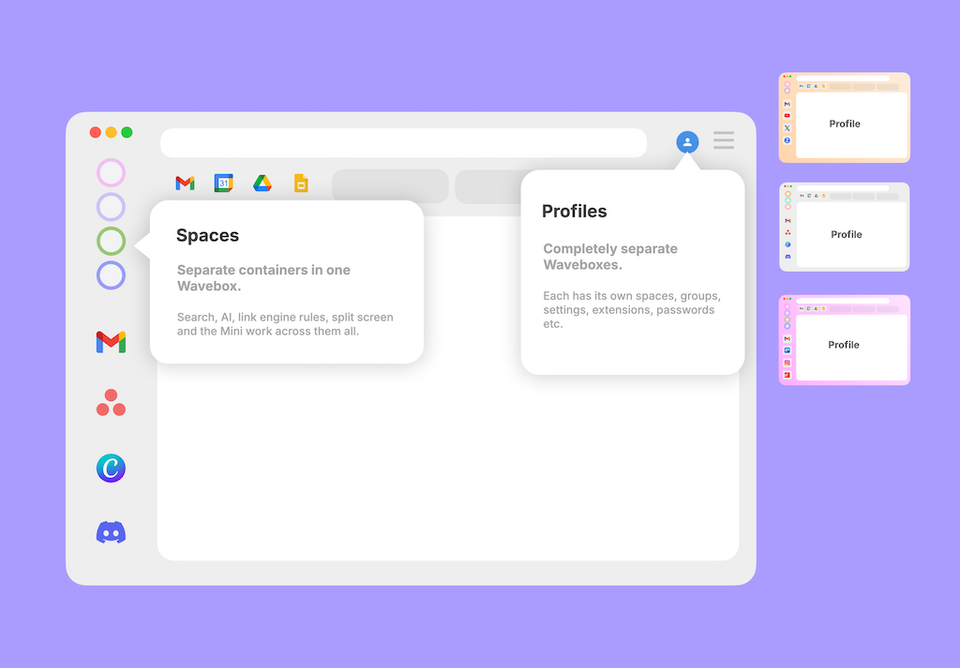
Spaces vs Profiles: Which One Should You Choose?
Both keep things separate, but differently. Spaces are drawers in one filing cabinet; a Profile is a whole second cabinet. When to reach for each.
What's the Difference Between Snapshots, Profile Sync, and Wavebox Live (Teams)?
Three features, three jobs: Snapshots back you up, Profile Sync follows you to your other computers, and Wavebox Live is your team's shared setup.
How to Stay Signed In to Every AI Account You Have
Work ChatGPT, personal ChatGPT, a client's Claude seat. How to keep every AI account signed in at once, in one window.
Looking for an App That Fits a Multi-Account Workflow? Ten Questions, Answered
Separate cookies per account, per-Space extensions, synced setups, and routed notifications. Ten multi-account browser questions, answered for Wavebox.