Learn about Spaces—the power behind multi-account management.
New: Pick a Space When You Create a Group
The "+ Add New Group" popover in the webdock now has a Space dropdown when in List and Explorer layouts.
Spaces vs Profiles: Which One Should You Choose?
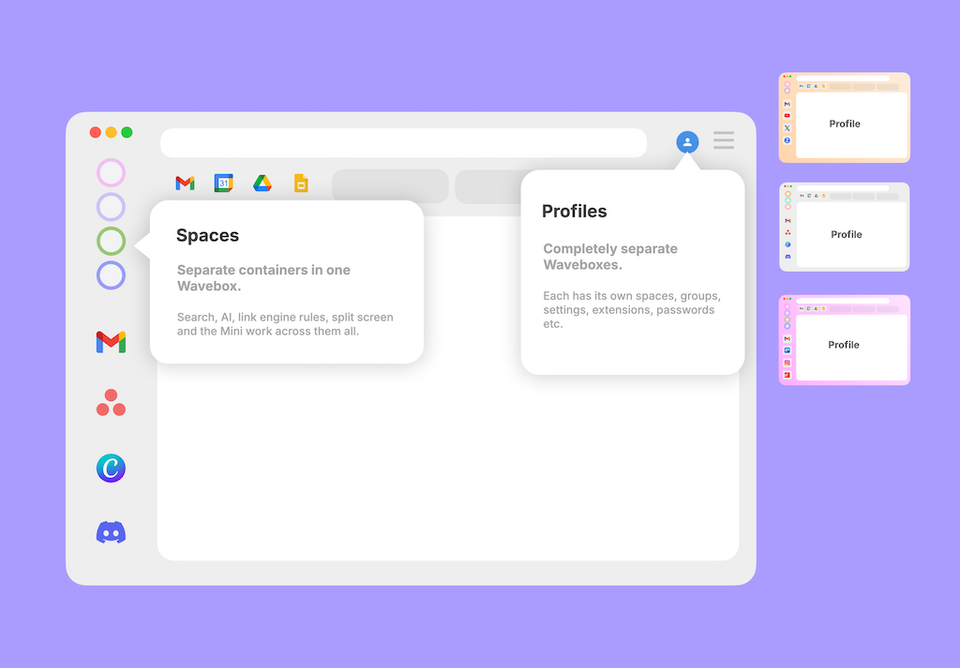
Both keep things separate, but differently. Spaces are drawers in one filing cabinet; a Profile is a whole second cabinet. When to reach for each.
How to Stay Signed In to Every AI Account You Have
Work ChatGPT, personal ChatGPT, a client's Claude seat. How to keep every AI account signed in at once, in one window.
Looking for an App That Fits a Multi-Account Workflow? Ten Questions, Answered
Separate cookies per account, per-Space extensions, synced setups, and routed notifications. Ten multi-account browser questions, answered for Wavebox.
🍪 What are Browser Containers (and What is a Container-first Browser)?
Browser containers let you stay signed in to multiple accounts of the same site at once. Here's how they work, and what container-first means.
Browser Containers Just Went Mainstream!
Native browser containers just went mainstream. Here's what they do, and how Wavebox Spaces put a whole workflow inside each one.
Tutorial: 3 Ways to Move Things Between Spaces.
Here are 3 easy ways to move groups, apps, and tabs between Spaces in Wavebox — drag and drop, manager, or manual settings.
Tutorial: How to Stay Signed-In to Multiple WhatsApp Web Accounts.
This tutorial shows you how to use two WhatsApp accounts side-by-side in the same browser window, with real-time unread badges and notifications.
Groups Using Multiple Spaces
A Group can hold apps and tabs from more than one Space. Here is where it shows in the webdock.
Why has a new Space been created for me?
Note! If you want to login to two different accounts