
How to Change the Wavebox Language

🆕 Wavebox now lets you use the interface — menus, settings, buttons and dialogs — in your own language. Because Wavebox is built on Chromium, changing the display language works exactly the same way as it does in Chrome.
Available Languages
Alongside English, the following translations are available now, with more on the way;
English (UK), Spanish, Spanish (Latin America), German, Italian, French, Danish, Dutch, Portuguese (Brazil), Portuguese (Portugal), Japanese, Korean, Chinese (Simplified), Polish, Swedish, Norwegian Bokmål, Finnish, Czech and Welsh.
If your language isn't there yet, let us know which one you'd like to see! In the app hover over the cog and select 'Feature Request' to get in touch. Or contact support or chat to us on Discord.
What's the difference between this and Wavebox Translate?
It's worth a quick clarification, as these two features are easy to mix up:
- Wavebox Language (this article) changes the language of Wavebox itself - the menus, settings and interface.
- Wavebox Translate translates the content of web pages you visit into your chosen language.
This guide covers the first one — changing Wavebox's own interface language.
Choosing your Language
Pick the instructions for your operating system below.
🪟 Windows
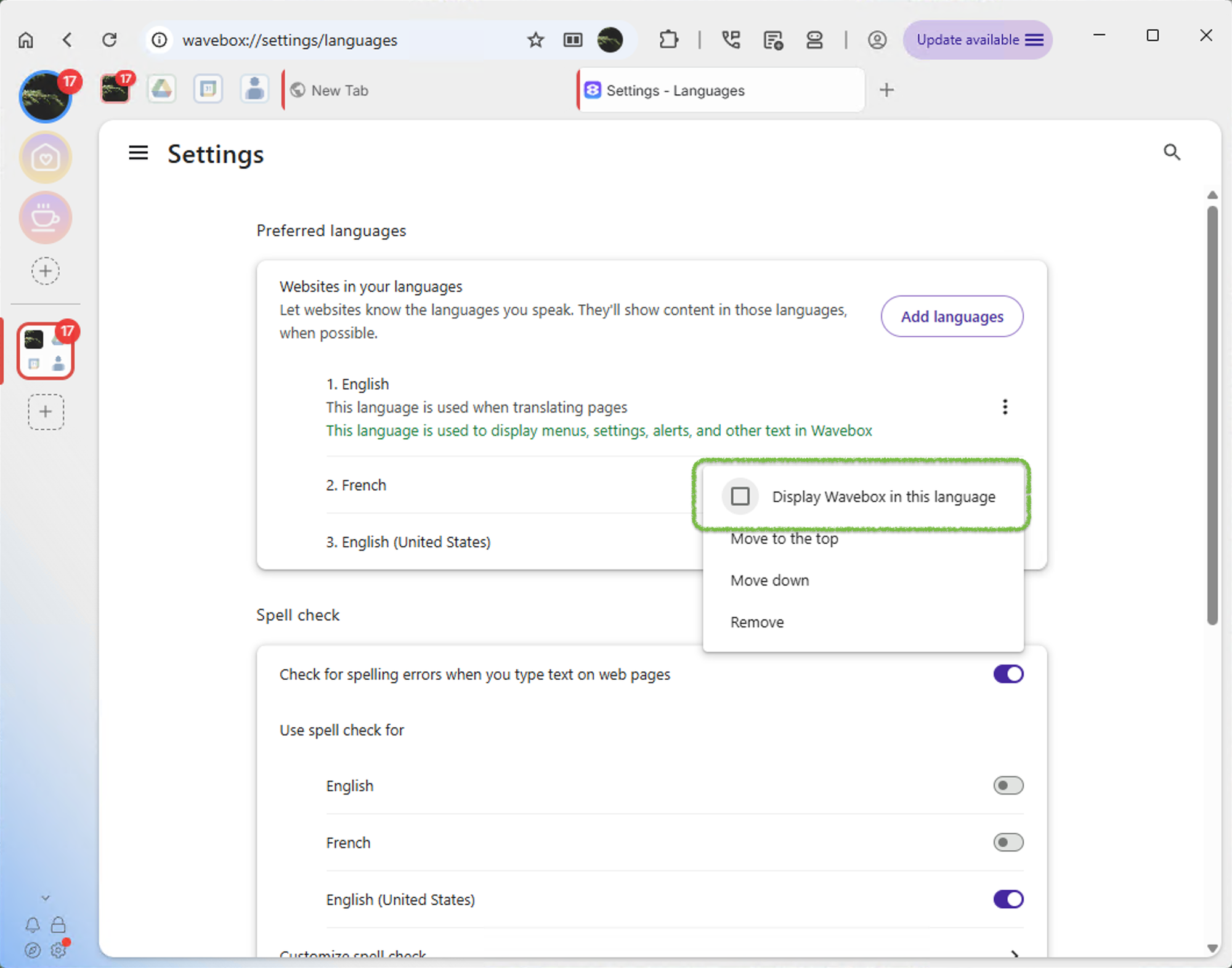
On Windows, you choose your language from inside Wavebox's settings
- Open a new tab and open wavebox://settings/languages. Or open Settings and click on 'Languages' in the sidebar.
- Click Add languages, find the language you want, tick it and click Add
- Next to your newly added language, click the ⋮ (three dots) and tick "Display Wavebox in this language"
- Click **Relaunch** to restart Wavebox in your chosen language.
🍎 macOS
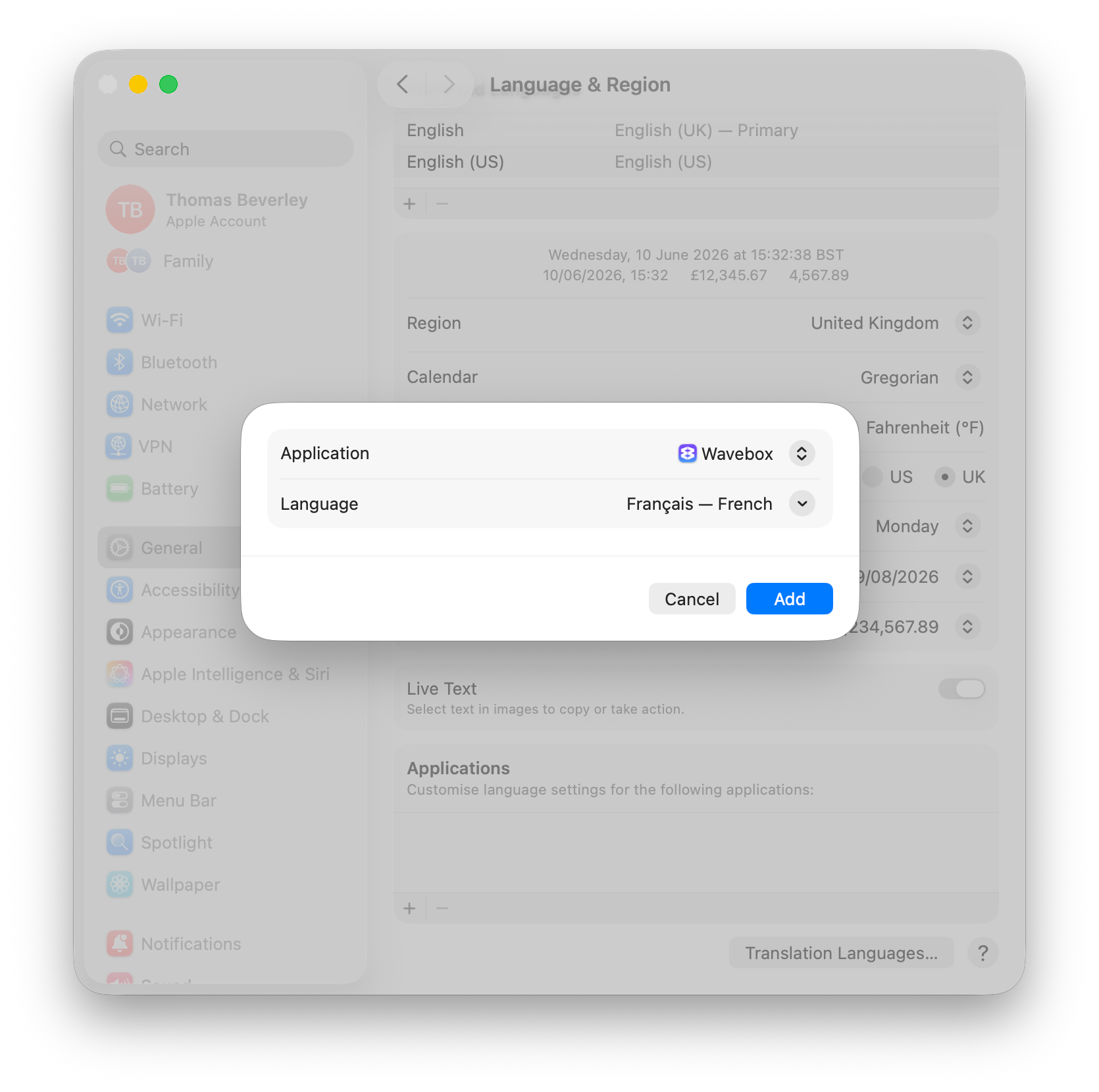
macOS can set a preferred language per app, which Wavebox will follow:
- Open macOS System Settings → General → Language & Region
- Under Applications, click the + button.
- Select Wavebox from the application list, then choose your preferred language.
- Click Add, then restart Wavebox when prompted.
🐧 Linux
On Linux, Wavebox follows your system locale. There are two ways to change it:
Option 1 - Launch with a language flag
Start Wavebox with the LANGUAGE environment variable set to your language code, for example:
LANGUAGE=fr waveboxReplace fr (French) with the code for your language — e.g. de (German), es (Spanish), pt_BR (Brazilian Portuguese), ja (Japanese).
Option 2 — Change your system language
Set your preferred language in your distribution's settings (e.g. Settings → Region & Language on GNOME), then log out and back in. Wavebox will pick up the new system locale the next time it launches.
Spotted a language issue?
Sometimes, the odd clunky phrase or stray English string can slip through. If you find one, we'd love to hear about it via the in-app support button!