🚀Eleven Clients, One Workspace: How I setup Wavebox for VA Agency byFriday

Guest Post by Kerri Theriault, Fractional CTO at Key True Consulting
I see the same thing with almost every growing service business I work with: they've outgrown their tools, but they're still trying to make them work. When Stephanie from byFriday reached out, she knew something had to change — she just wasn't sure what.
byFriday is a virtual assistant company that handles all the administrative tasks small business owners don't have time for. Stephanie built the company on the idea that there's always a better way to do things, which is exactly why her current browser setup was driving her crazy.
🤯 Eleven Clients, One Overwhelmed Team
Here's what the day-to-day looked like: byFriday manages eleven different clients, each with their own Google Workspace, Outlook, Teams, Notion, Trello, Asana, Squarespace, Meta Business Suite, LinkedIn — you name it. All of that was running through a mess of Chrome profiles and windows.
Stephanie and her team were constantly switching between profiles, trying to remember which window belonged to which client, triple-checking they weren't about to send an email from the wrong account. It sort of worked, but things slipped through the cracks.
The real headache, though, was onboarding. Every time someone new joined, Stephanie had to walk them through setting up separate Chrome profiles for each client, bookmarking all the right tools and getting logins sorted. For a VA company where team members juggle multiple clients at once, this ate up hours and still left room for mistakes.
I knew Wavebox could fix this. I just had to show Stephanie how.
🪐 Setting Up: One Space Per Client
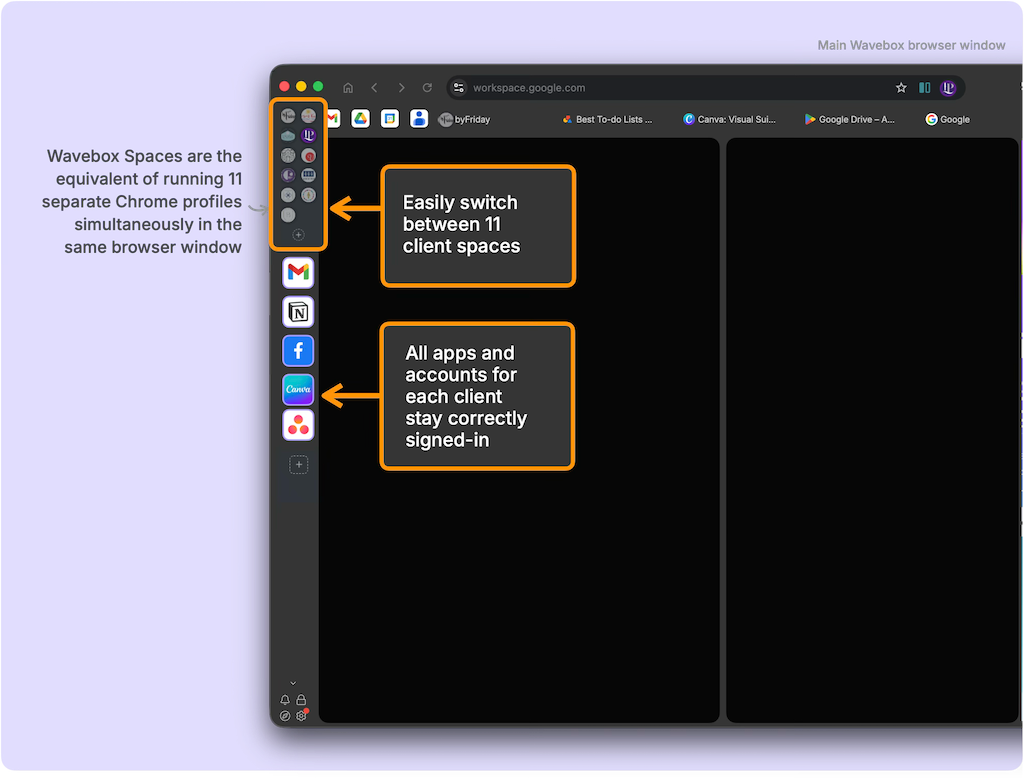
The approach was straightforward — create a Space in Wavebox for each client. Think of Spaces like separate chrome profiles, or browsers that all live inside one window. Each one keeps its own logins and cookies completely walled off, so there's zero chance of mixing up accounts.
Inside each Space, I grouped apps (shown as rounded squares in the screenshot above) based on how byFriday actually works. Some clients needed a Communication group (Gmail, Slack, Teams), a Project Management group (Asana, Trello, Notion), and a Social Media group. Others had simpler setups depending on what that client required.
I also "boosted" key tabs into permanent apps. Regular browser tabs vanish when you close them, but apps in Wavebox stick around like the icons on your computer's desktop. They also show notification badges and, for a VA team managing multiple inboxes and projects, those little red badges mean you always know where something needs attention — without manually checking every account.
I rounded things out with the LastPass and Toggl extensions. Password management and time tracking — both non-negotiable for a VA company.
The whole setup took a few hours, but once it was done, it was done. No more rebuilding it from scratch for every new hire. Sharing the setup I had created was easy too — I just created a template that could be used again and again to quickly onboard any new member of the team.
✅ Staying On Top of Everything
This is where things really clicked for byFriday.
With everything staying signed in and updating in real time, the team suddenly had visibility across all their clients without hunting for it.
The Wavebox Mini became their go-to dashboard — one click and you get an overview of new emails, unread messages, and notifications across every client. One glance tells you exactly where you should start your day, or turn to next.
And when you need to put your head down and focus on one client's work? Focus Mode turns off the noise from everything else with a single click.
Then there's search — and honestly, this one surprised me with how much of a difference it made. Wavebox's global search works across all your Spaces at once. Need that Trello board from one client, or an email thread from another? Just search using any keyword. In seconds you have what you were looking for, instead of clicking through profiles/tabs/bookmarks trying to remember where exactly you saw it.
🏆 What Actually Changed
Stephanie summed it up nicely:
"We were constantly flicking between multiple different Chrome profile windows to manage our tasks and with Wavebox everything is in one place without being overwhelming."
But the biggest win might have been onboarding.
Instead of the old routine of walking new hires through Chrome profiles and bookmark folders, I can now share a Wavebox setup link — spaces, apps, tabs, even saved passwords — and the new team member imports it in minutes. Everything's already organized and ready to go.
There was also something I hadn't fully anticipated. In Stephanie's words:
"A workflow we're using daily since implementing Wavebox is a higher transparency with outstanding work. It's easier for us as a team to see where someone else needs a hand."
When everyone's working from the same structure, it's just easier to jump in and help each other out.
🧘 The Mental Load Relief
When I ask clients about time savings, they often struggle to put a number on it. Stephanie's answer gets at something deeper: "I'm not sure I can calculate exactly how much time we've saved but the mental load it has provided for myself has been worth every second."
That's the hidden cost that never shows up in a time tracker — the constant mental effort of managing which window is which, double-checking you're in the right profile before hitting send. It's exhausting in a way that's hard to quantify but impossible to ignore once it's gone.
With Wavebox the mental burden just disappears.
Each client has their Space. Each Space has its organized groups. The structure is consistent and clear, allowing your brain to focus on the actual work instead of managing the workspace.
👏 Why This Works And It Matters Beyond byFriday
Real productivity isn't about speed; it’s about context management.
In the world of consulting and content creation, we are often sold the lie that "productivity" is about doing things faster. We download the newest apps, try the latest "hacks," and yet still end up at 5:00 PM with forty open tabs and a brain that feels like it’s been through a blender. To scale your output without burning out, you don't need a faster mouse; you need a system of work.
In fact, I use the same approach for my own life—consulting, my podcast, product development, personal stuff—Wavebox lets me compartmentalize all of it (a separate space for each) so I can give each area my full attention while still keeping an eye on what matters across the board.
Chrome profiles seem like they should solve this problem, but they fall apart quickly. Each profile is totally isolated, switching between them is slow and disruptive, and there's no way to see the big picture across all of them at once. Wavebox gives you the same secure separation while keeping everything accessible in one window.
🌱 A System That Grows With You
As a Fractional CTO, my job is spotting these friction points and implementing solutions that grow with the business. What I love about this setup for byFriday is that it's not just solving today's problem — it's infrastructure......
New client? Create a new Space. New team member? Share the template.
The system scales without adding complexity, which is exactly what good technical infrastructure should do: get out of the way and let you do the work.
If you're running a multi-client business and fighting similar battles, the fix might be simpler than you think. Sometimes it's not about finding new tools — it's about organizing the ones you already have.
Download Wavebox and try it free for 7 days:
Managing multiple clients or aspects of your personal life and drowning in Chrome profiles? See how Wavebox's Spaces and organized app groups can transform your operations. https://wavebox.io/download
Key True Consulting is a trusted Consulting Partner and can help with your implementation to streamline your workspace operations. View our directory and book your FREE consultation with Kerri today: https://wavebox.io/consultant-directory
Kerri Theriault is a Fractional CTO at Key True Consulting, helping small teams turn technical chaos into systems that scale. Learn more at www.keytrueconsulting.com
Stephanie Boyle is CEO of byFriday, a “virtual assistant/Jane of all trades” company designed to help small business owners be more productive. Learn more at www.finishedbyfriday.com


 Susan Davies
 Susan Davies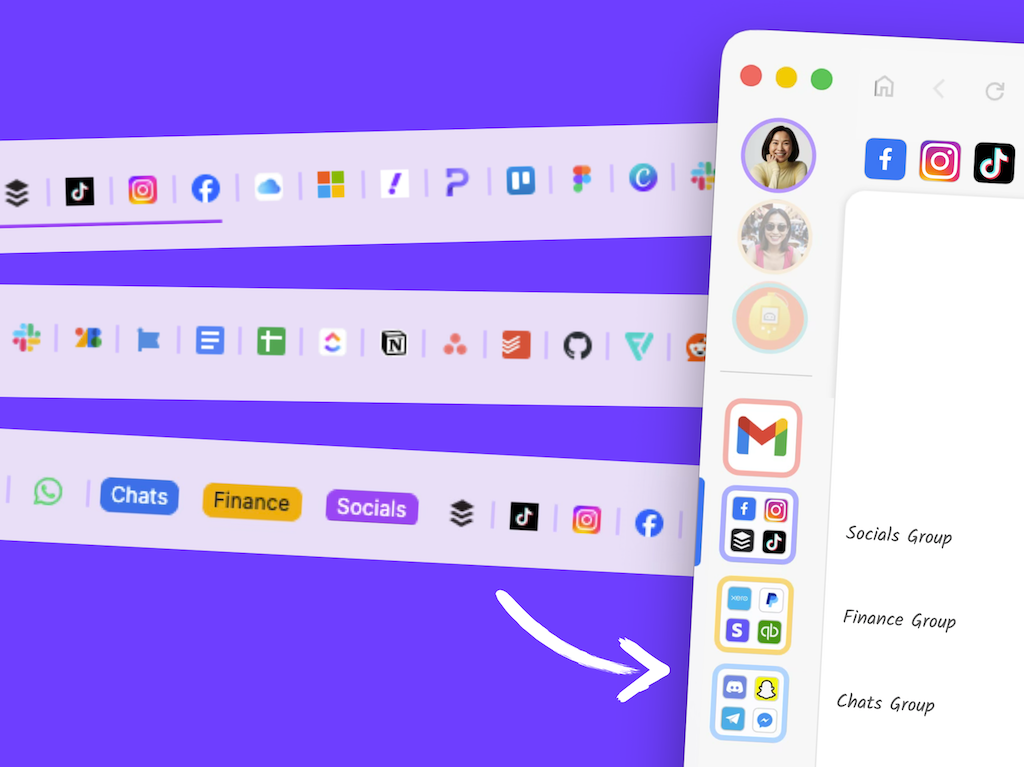
 Susan Davies